Features
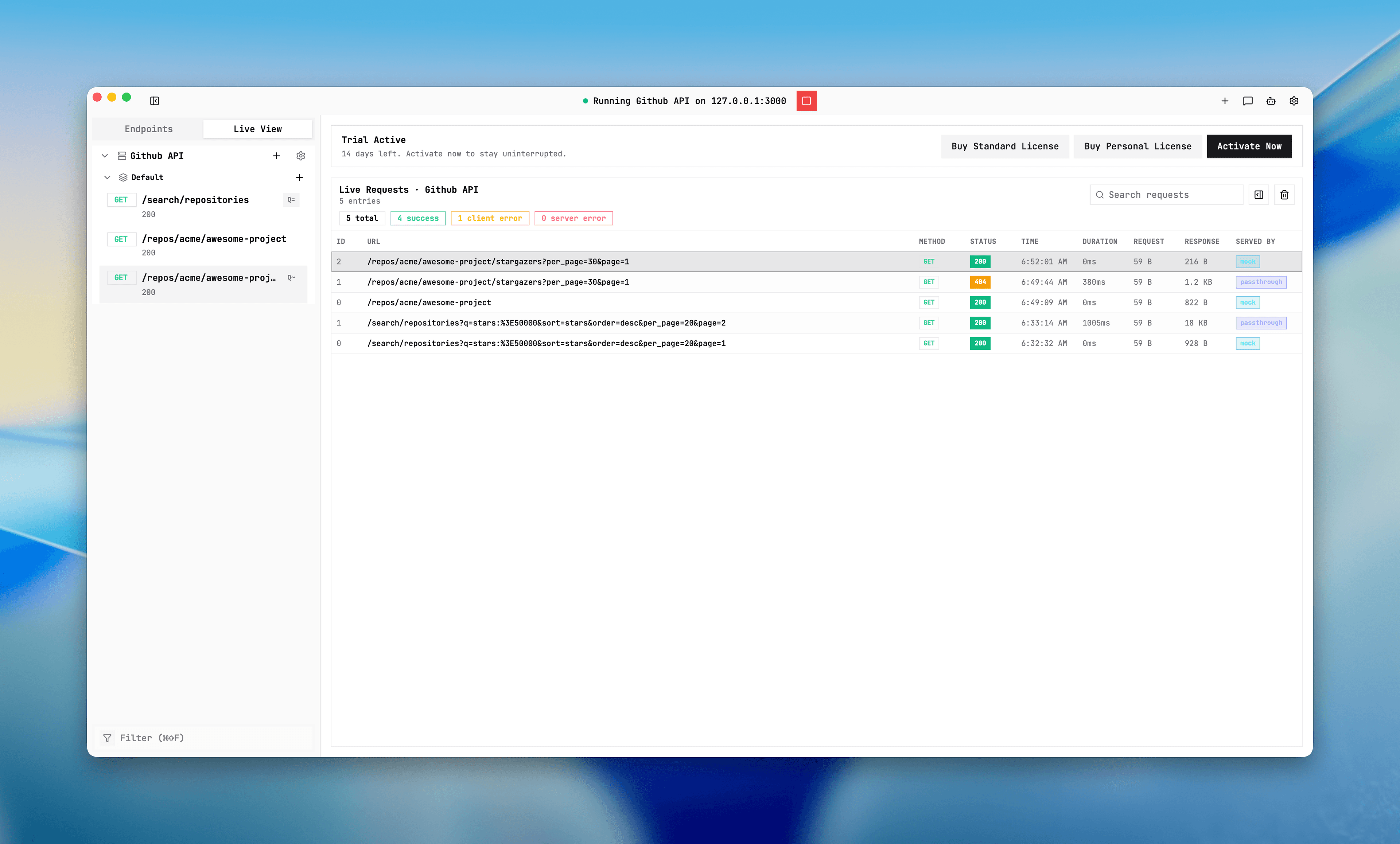
Debug with Live View
Live View is the fastest way to verify route selection and payload behavior in real time.
Purpose
Provide request-level observability while debugging matching and upstream behavior.
Where this is used
- After server start, confirm endpoint hits.
- Differentiate mock vs passthrough vs fallback behavior.
- Inspect request headers/body and response headers/body.
Setup and prerequisites
- A server started or at least one request in scope.
- Live View page open (or switch to it after sending traffic).
- Request logs for selected server are enabled by default.
Step-by-step
- Send at least one request to selected server.
- Open Live View.
- Read row fields: method, path, status, duration, served-by.
- Open request detail and confirm request/response headers and body.
- Use filters to narrow by status or path.
Expected result/output
- `served-by` shows one of `mock`, `passthrough`, `strict_404`, `passthrough_error`.
- Requests are shown in near real time with timestamped logs.
- Logs are capped at 1000 entries and include truncation markers for large content.
Common issues + fixes
- served-by is `strict_404`: check matching rules and route specificity.
- served-by is `passthrough_error`: inspect backend URL and templates.
- Missing logs: confirm the correct server is selected and running during test requests.
Live View request trace
Screenshot placeholder
Placeholder: request list with served-by and request details panel.