How to
Import and export
Use the right format for the job: workspace JSON for full backups, collection packs for reusable groups, and OpenAPI import/export for server-level interoperability.
Choose the right format
- Workspace JSON: use for full backup/restore of your local Mockphine workspace.
- OpenAPI: use for importing/exporting one server as an API spec (v2/v3).
- Collection pack JSON: use for sharing a reusable subset of endpoints.
Import actions are protected until activation. Complete Activate and license first.
What you can import and export
- Export a full workspace to JSON.
- Import a workspace JSON into Mockphine.
- Export a selected server to OpenAPI v3 YAML.
- Export a selected server to OpenAPI v2 (Swagger) YAML.
- Import OpenAPI v2/v3 from YAML or JSON into a selected server.
- Import OpenAPI v2/v3 from the empty state to create a new server automatically.
- Export a collection as a pack JSON and import it into another workspace.
- Use built-in packs (Auth, Pagination, Stripe-like errors) to start fast.
OpenAPI import workflow (recommended)
- Ensure activation is complete.
- Choose the target server (or start from the empty state).
- Open the server Data menu and select
Import OpenAPI. - Select a `.yaml`, `.yml`, or `.json` OpenAPI file.
- Review any OpenAPI import warnings shown after import completes.
- Test key routes in Live View before relying on the imported setup.
OpenAPI import behavior
- Selected-server import replaces that server collections and endpoints only.
- Selected-server import keeps server settings unchanged (name, local host/port, real backend URL, and fallback mode).
- OpenAPI import supports
.yaml,.yml, and.json. - Mockphine auto-detects OpenAPI v2 vs v3 on import.
- Import uses best-effort mapping. Unsupported constructs may be skipped and shown in an OpenAPI import warnings dialog after import.
- Empty-state import can create a server from Mockphine metadata (
x-mockphine-server) or infer basic settings from OpenAPIinfo.titleandservers. - Invalid OpenAPI files do not create a server in empty state import.
- Mockphine-generated OpenAPI preserves same-route cases, wildcard route intent, and passthrough path templates through Mockphine-specific metadata when re-imported into Mockphine.
Workspace and pack import notes
- Pack import requires
schemaVersion = 1. - Imported pack items are re-IDed to prevent ID collisions.
- AI provider API keys are not included in workspace or pack export/import.
After any import, scan endpoint modes and a few representative routes first so you catch mismatches before broader testing.
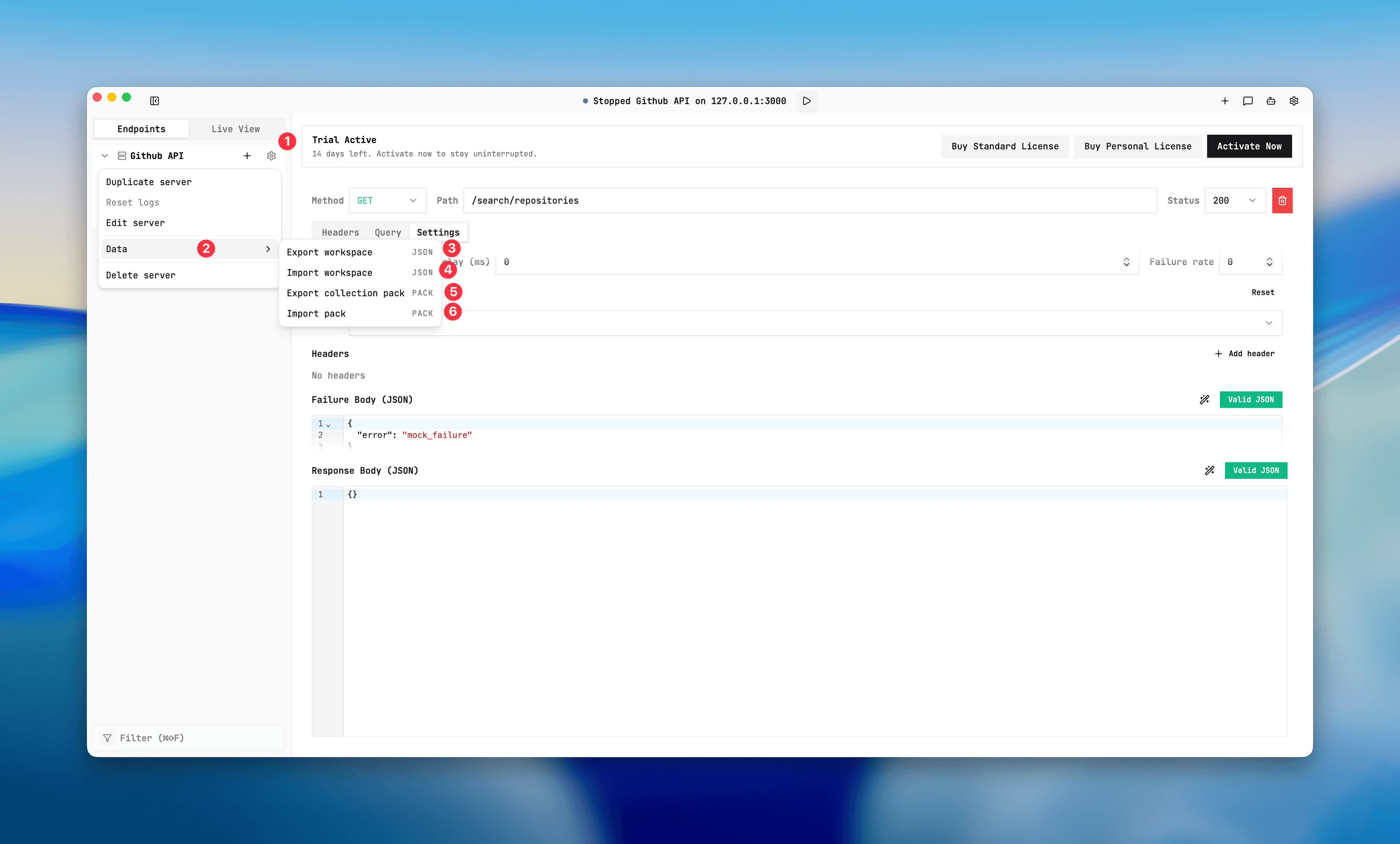
Import and export menu
Screenshot
Use the server menu Data section for workspace JSON, OpenAPI (v2/v3), and collection pack import/export actions.